|
About Valuatum System
System consists of HTML pages and Java Client
|
|
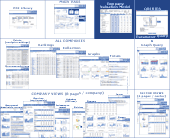
In the picture on the right you can see that Valuatum
System is divided into the two parts:
 HTML
pages (demo
version) HTML
pages (demo
version)
Java
Client (screenshots)
HTML pages can be seen with common browsers but
Java Client demands on installation of Sun Microsystem's
Java Web Start (JWS). JWS is currently included
in latest Java
Runtime Environment (JRE) so if the user has
new JRE installed, then there should not be any
problems using our applications.
|
(Click picture to enlarge it.)
|
|
Installing Java Client
Why Java Web Start is needed?
Java Client includes company valuation models, which
enable users to look how their own scenarios effect on
the valuation of a company. In order to use Client, Sun
Microsystem's Java Web Start must be installed to the
user's computer.
What Java Web Start does?
Java Web Start enables java applications, used over the
internet, to be saved to the user's computer. Read
more info about Java Web Start from here. Web Start
has two main advantages:
|
|
When the application is used, the files needed for the
application has to be downloaded only once over the internet.
|
|
When the application is updated, Java Web Start downloads
the updated files automatically.
|
Connections
All
the connections use http protocol and port 80.
All
the connections are taken from the client side.
Local disk
What files are saved to the local disk?
Java Client does not download any .exe or .com
files.
Java Web Start saves the following type of files to the
local disk:
|
|
.jar-files. These files are zipped java class
files, which are downloaded to the Java Web Start's directory
(usually C:\Documents and Settings\Administrator\Application
Data\Sun\Java\Deployment\javaws\cache).
|
|
The .jar-files, mentioned above, include Java Client
program and when the program is used, the following kind
of files may be saved to the local disk:
|
|
.val-files. If the user wants to save his/her
own company valuation model to the local disk, the numbers
are saved as a .val-file (ab. 60 kB) to the folder that
user defines him/herself.
|
|
What information is sent from the computer to the server?
Company valuation models are executed locally. No information
is sent to the server unless a user saves a model to the
server him/herself.
Valuatum can from the server log file see what models
a user has opened but not what he/she has done with the
models (i.e. what numbers have been changed etc.).
|
Problems in the installation?
If you during the installation get the message "Error
invoking java...", the problem may be that you
do not have proper rights to use your computer. Login
to your computer using administrative account and try
to install Java Web Start again.
Another reason may be a too old operating system or a
too old service pack of an operating system.
Other problems, see troubleshooting.
More info
About
the product and the main idea
Quick
help and Screenshots of Java Client
HTML
pages (password is needed)
 Demo
version Demo
version
Java
Client installation instructions and Java Web start installation
file
If
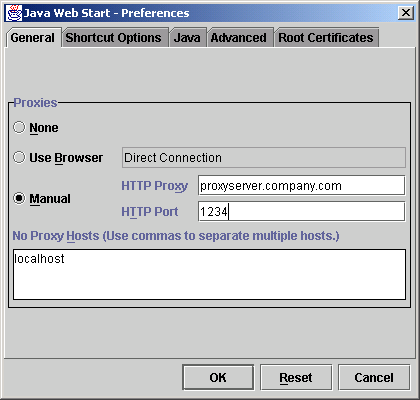
there are problems with the proxy settings, try these
links:
Troubleshooting
Screenshot
of proxy settings
Start
Java Client: http://server.valuatum.com/client.jnlp
(Java
Web Start and password needed)
Sun
Microsystems
Java
Web Start document
Valuatum
contact information
|
|
If you need any help or support, please contact us:
 . .
|
|
|